

Reliable video QC is a workflow design problem. The useful checks are automated early, exceptions are easy to find, and final approval stays with a person who understands the story, audience, brand, and client requirements. This breakdown shows how TCV supports that model with project provisioning, deterministic ingest routing, technical checks, assisted review, and a required human gate before delivery.
What is an ingest-to-QC-to-delivery system?
An ingest-to-QC-to-delivery system is a video workflow automation layer that moves footage from upload to editor handoff, technical QC, human review, and organized delivery. For production teams, the goal is to automate repeatable operations while keeping creative approval and decisions about client readiness in human hands.
Automate repeatable checks. Keep context and approval human.
Use a model to move easy-to-miss checks earlier and give the person reviewing the cut better information. This is the split we use when deciding what belongs in the system.
| QC area | Default owner | Why |
|---|---|---|
| File naming and resolution | Automate | Repeatable rules can flag exceptions before an editor opens the project. |
| Loudness, true peak, and silence | Automate | A policy-driven check is consistent and produces a visible result. |
| Black frames and flash frames | Automate + review | Detection can surface a moment; an editor decides whether it is an error or an intentional choice. |
| Caption spelling and grammar | Assist + review | An agent can check an SRT and return a corrected draft, but names, terminology, timing, and meaning still need confirmation. |
| Pacing, story, and brand fit | Human review | These decisions depend on context, audience, messaging, and the client’s expectations. |
| Final client readiness | Human approval | Automation can report what it found; a person remains accountable for the delivery decision. |
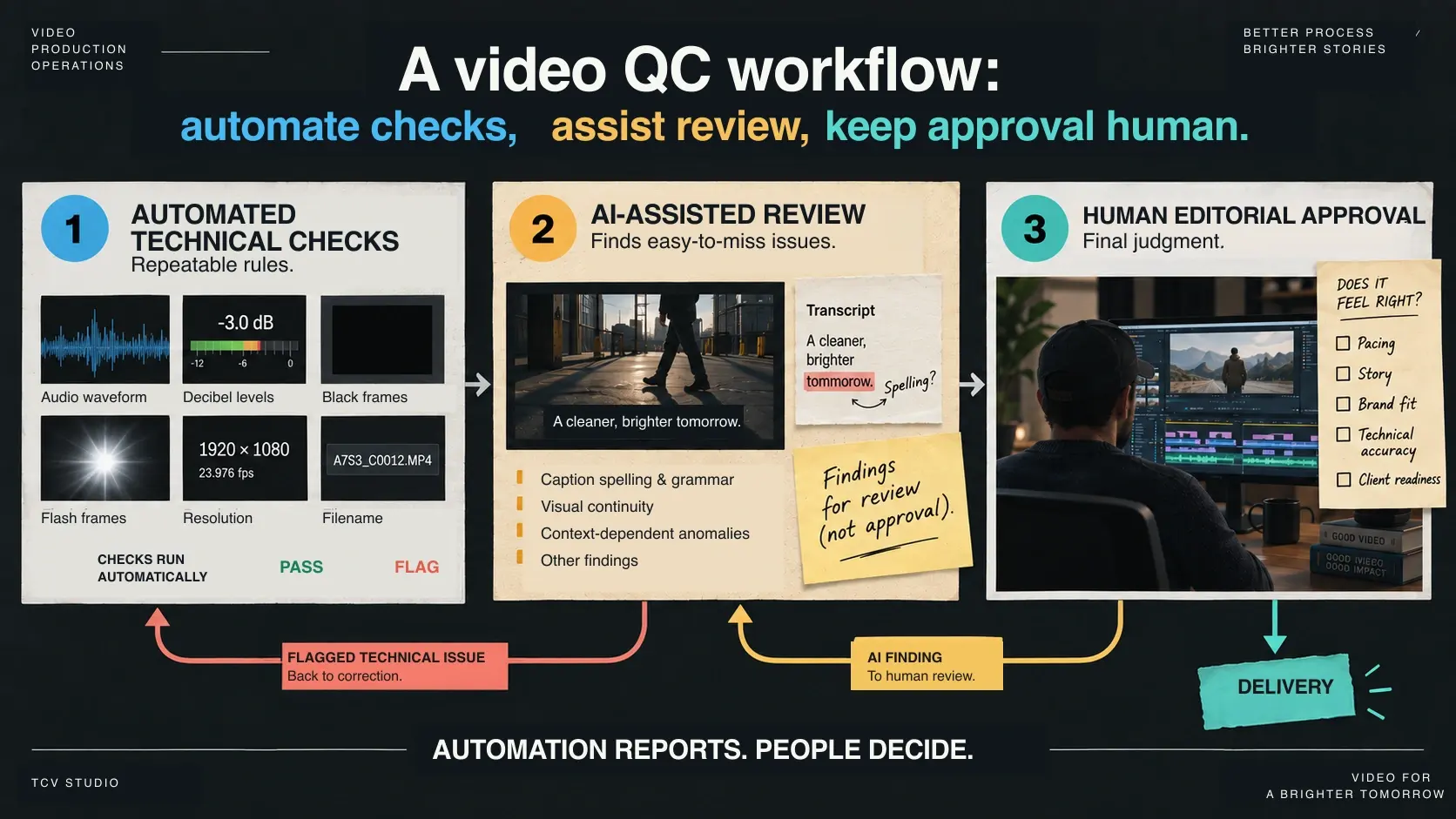
A useful QC system protects attention for editorial decisions.
We automate repeatable setup and technical checks, then keep a human review gate on delivery. Editors get fewer avoidable interruptions, while leads can see what passed, what failed, and what still needs judgment.
The system uses role-based access segmentation and deterministic routing designed to reduce accidental exposure and misrouting. Security controls and retention rules still need to match the client, project, and storage environment.
- Reduce setup work by automating project provisioning, ingest routing, proxy prep, and QC handoffs.
- Give editors a consistent starting point with assigned media, preconfigured assets, and organized project folders.
- Keep craft judgment explicit with a human review gate on top of automated technical checks.
Editorial teams lose time to project prep, media wrangling, and QC coordination when operational systems are manual. The architecture had to remove this overhead without weakening security, routing determinism, or final human quality control.
We needed a reliable control system. The dashboard lets specialists focus on creative work with fewer operational interruptions.
Manual video workflows create hidden coordination costs.
| Workflow area | Manual process | Automated system | Business impact |
|---|---|---|---|
| Project setup | A producer or editor builds folders, names paths, assigns access, and checks setup by hand. | A Notion-triggered kickoff provisions folders, defaults, permissions, and project identity before media arrives. | Less setup drag and fewer handoff errors. |
| Ingest routing | Uploads rely on filenames, notes, or human interpretation to reach the right project lane. | Folder-path project identity routes raw media into the correct ingest, proxy, review, and delivery paths. | Cleaner routing and fewer ambiguous uploads. |
| Technical QC | Editors or leads spot-check loudness, black frames, silence, resolution, and naming late in the review cycle. | Programmatic checks run early, then move exceptions into visible states for review. | Issues surface before they become client review cycles. |
| Creative approval | Approval status can live in comments, chat, or memory. | Human review remains a required gate with explicit pass, reject, or awaiting-approval states. | Better-informed decisions without removing craft judgment. |
More throughput with the same review standard.
Editors open projects with media, proxies, and structure already in place.
Project-scoped access and explicit QC state transitions reduce hidden failures and misrouting.
Standardized lane design supports repeatable execution across projects and editorial teams.
Raw projects can remain organized for revisions and follow-on deliverables when the project policy calls for it.
Control Plane (DigitalOcean)
- Project API receives Notion relay kickoff and creates standardized project scaffolding
- QC service (port 8009) runs poller, ingest router, analyzer, state machine, and archive logic
- Ops tooling monitors health, surfaces exceptions, and reconciles stuck/error states
Data Plane (Seafile)
- Project structure includes ingest, active project, proxies, review/QC lanes, and delivery destinations
- Folder-path project identity (/01_INGEST/<PROJECT_ID>/...) is authoritative for routing
- Archive mode writes back into project raw-footage tree for editor continuity and retention
Access & Governance
- ACL-separated group access constrains ingest-only and edit/review/delivery roles
- Project-folder ingest guardrail blocks ambiguous root uploads and surfaces operator-visible exceptions
- Human QA gate remains explicit for approval/rejection when policy requires review
Notion triggers project creation through the relay endpoint. Project folders, defaults, and permissions are provisioned before media lands.
Raw media is uploaded into /01_INGEST/<PROJECT_ID>/... and routed using folder identity to avoid filename-driven ambiguity.
Ingest-first proxy generation prepares editor-ready files in the project proxy path while preserving project context.
Policy-driven checks evaluate loudness, peak, silence, black frames, flash frames, runtime, resolution, and filename patterns.
Review-required outputs move into explicit approval states. Leads approve/reject instead of relying on silent assumptions.
Approved outputs route to delivery while reports and source media remain organized in project storage for fast future re-entry.


The operations console and Seafile workspace make project state, ingest paths, QC status, and delivery organization visible to the production team.
Deterministic checks, policy-driven thresholds
- Audio loudness (EBU R128 LUFS)
- True peak
- Silence gaps
- Black frames and flash frames
- Runtime and resolution
- Filename pattern validation
After the FFmpeg pass, a video-capable model can add context-dependent findings. The Gemini API documents direct video input, including audio, timestamps, long-context processing, and streaming for longer requests. In TCV’s workflow, this has been especially useful for captions: export the SRT, ask an agent to check spelling and grammar, return a corrected draft, and re-import it into Premiere. The editor still checks timing, speaker names, product terminology, and meaning before delivery. This makes a recurring check more systematic; it does not guarantee perfect captions or replace final review.
Explicit states and recoverable failure paths
- Idempotent job submission by job_id / idempotency key
- Explicit state machine (SUBMITTED -> RUNNING -> PASS | AWAITING_APPROVAL | FAIL | ERROR)
- Auto-retry on ERROR with configurable retry limits
- Admin reconcile tooling for stale jobs and exception recovery
- Safe archive fallback path when project destination resolution fails
The workflow stays useful after the first delivery.
ACL-controlled folders ensure editors only access assigned work paths
Project-folder ingest guardrail prevents ambiguous routing and accidental assignment
Exception queues and reconcile tooling surface failures so nothing disappears silently
Project retention follows the agreed policy and can keep raw projects available for revisions and follow-on deliverables
Structured project storage is designed to shorten restart work for revisions and follow-on deliverables

Common questions about video QC workflows.
What is a video QC workflow?
A video QC workflow combines repeatable technical checks, assisted findings, and human review before delivery. It can cover project setup, ingest routing, proxy preparation, audio and picture checks, caption review, state tracking, and delivery organization without removing human creative judgment.
What QC checks should a video production workflow include?
A practical video QC workflow should check audio loudness, true peak, silence, black frames, flash frames, runtime, resolution, and filename patterns. For client work, those technical checks should feed into a human review gate before delivery.
Why keep a human review gate after automated QC?
Automated QC is good at finding technical issues, but it cannot fully judge pacing, story, brand fit, or whether a piece feels right for the audience. A human review gate keeps craft decisions explicit while automation handles the repeatable checks.
Bring us your ingest, QC, or delivery bottleneck.
We’ll help separate the checks worth automating from the decisions that need an editor, then map a practical path to delivery.